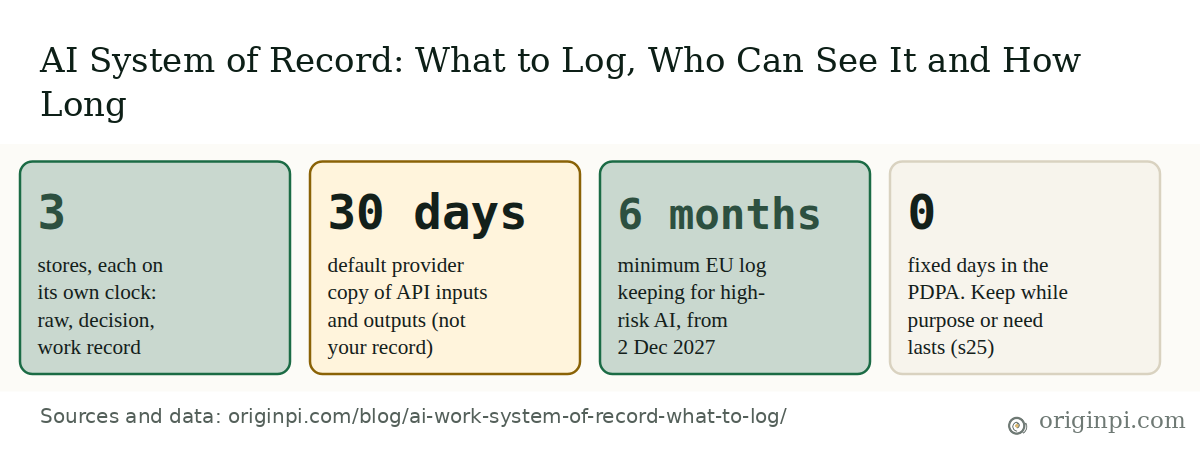
An AI system of record is three stores on three retention clocks, not one big log. Raw prompts and outputs sit in a restricted store that expires in days or weeks. A lean decision record, made of identifiers and hashes (a hash is a fingerprint of the text, not the text), is kept for a written audit window. The approved result is kept as long as the business record it supports. This is for the owner, CTO and compliance lead who must be able to say what the AI was asked, what it did, who could see it, and when it was deleted.
Try it on one answer. Pick an AI output your team used last month. Can you show who asked for it, who approved it, who has opened the prompt since, and whether that prompt is still sitting in a place it should have left?
Three dated anchors set the frame. Singapore's PDPA section 25 limits how long personal data may be kept. IMDA's Model AI Governance Framework for Agentic AI, version 1.5 of 20 May 2026, makes logging a core component of an agent. The EU AI Act's record-keeping rules for high-risk systems apply from 2 December 2027, not 2026.
This is general information, not legal advice. Our post on the six questions an investigator asks covers what one decision record must contain. This post covers the stores around it: what else to keep, who may open it, and when it must go.
Update, 28 October 2026: We re-checked the retention sources. PDPC's Key Concepts guidelines, which carry the retention chapter, are now a consolidated edition revised 29 April 2026 with the same paragraphs and wording, so we updated the date and link. Anthropic's and OpenAI's 30-day wording and IMDA's framework (version 1.5, updated 5 June 2026) still match.
At a glance: one AI action, three records, three clocks
Retention figures are from the PDPC, the EU AI Act and two provider pages, all cited below.
What belongs in a system of record for AI work?
A system of record for AI work holds three kinds of record, each with its own owner and clock. Raw content is what was typed and returned. The decision record shows what the AI did and who allowed it. The work record is the approved result the business relies on. Mixing them forces one retention period on three different risks.
A single prompt log has three problems. It holds personal data, so it should expire. It is too thin to explain a decision, so it cannot serve as evidence. And it never recorded which output a person approved and used. Splitting the stores fixes each one.
| Store | Holds | Kept for | Seen by default |
|---|---|---|---|
| Raw content | Prompt text, output text, retrieved passages, attachments | Shortest period your purpose allows | Few people; each opening logged |
| Decision record | Action ID, who asked, versions, rule, approver, before and after references | A written audit and dispute window | Operators and auditors |
| Work record | Approved output, template and model version, approver, date, where it was used | As long as the business record it supports | Owners, reviewers, auditors |
The "kept for" column is our design suggestion, not a legal minimum.
How one AI action fills three stores
The dashed box is a copy you do not control.
Three habits make the split work. Write the decision record before the action runs, and store references and hashes instead of text. Write the work record at the confirm step, because that is the moment a person approves one specific output. And scrub the raw store at the point of writing, since IMDA warns that when agents share context, memory and intermediate outputs, this "increases the likelihood for sensitive data to be unintentionally logged".
A hash has limits, so say what it proves and what it does not. It shows that a stored text has not changed since it was hashed, but only to someone who still holds the original to compare it with. It does not show what the text said, so once the raw text has expired a hash cannot explain a decision on its own, and it is weak evidence if a regulator or a court asks for the exact input. A hash that can still be tied to a person may itself be personal data, so give it a clock too. Keep the fields that do the explaining (the rule applied, the inputs by reference, the approver) next to it.
How much to record about each action is a risk call. IMDA's framework tells organisations to set monitoring objectives first and to "prioritise monitoring for high-risk activities such as updating database records or financial transactions". Drafting a blog outline needs a work record at most. Issuing a refund needs the full decision record.
Who should be able to see what in an AI record?
Give the most people the least sensitive store. Operators and auditors read the decision record; very few open raw prompts, and every opening is itself logged. PDPA section 24 requires reasonable security arrangements against unauthorised access, use and disclosure of personal data, and raw prompts often hold customer names, quotes and complaints.
Access design
Who can open which record
Our suggested defaults for a small business. Hide a role you do not have, or show only the rows where roles differ.
| Record | Operator | Approver | Auditor | AI provider |
|---|---|---|---|---|
| Raw prompts and outputs | Limited, logged | Items they approve | On request, logged | Yes, it processes them |
| Decision record | Yes | Own approvals | Yes | No |
| Work record | Yes | Yes | Yes | No |
| Access log (who opened what) | Cannot edit | No | Yes | No |
| Deletion and hold log | Runs jobs, cannot edit | No | Yes | No |
Key: sees by default · limited, or on a logged request · no access
Origin Pi design suggestions, not a legal standard. The provider column reflects that the provider must process the prompt to answer it.
Each role has one job in this design. The CTO builds role-based access and the access log, so "who opened the raw prompt" has an answer. The owner decides who may break the glass (open raw prompts in an emergency) and for what reasons. Compliance samples the access log each quarter. If the AI provider is a vendor processing personal data for you, PDPA section 4(3) gives you "the same obligation" for that data "as if the personal data were processed by the organisation itself", and the PDPC's AI guidelines (paragraphs 1.4 and 11.2) treat third-party developers of bespoke AI systems as data intermediaries.
How long should AI prompts and outputs be kept?
Keep each store only as long as its purpose lasts. The PDPC says the Retention Limitation Obligation "does not specify a fixed duration of time" for personal data (paragraph 18.2, revised 29 April 2026); the test is reasonableness, given why the data was collected and any other legal or business need. The answer is a written schedule per store, with a reason for each period, reviewed regularly. For a small firm, our starting point is raw content for 30 to 90 days, the decision record for about 12 months, and the work record with the business file it supports. Those are design suggestions, not legal minimums.
Interactive chart
The retention figures in the sources differ by a factor of 120
Months. Each bar measures a different thing, so compare the clocks, not the bars.
Provider default for API inputs and outputs is 30 days (shown as 1 month). The EU AI Act log floor is 6 months. The PDPC cites a 6-year limitation period for contract claims (72 months) and a 7-year example for contract records (84 months). EU provider documentation is kept for 10 years (120 months).
| Item | Months |
|---|---|
| AI provider default, 30 days | 1 |
| EU log floor, high-risk AI, from Dec 2027 | 6 |
| Limitation period, contract claims | 72 |
| PDPC example: contract records | 84 |
| EU provider documentation | 120 |
Four things set the clock for any one store.
- Purpose. The PDPC says personal data "must not be kept by an organisation 'just in case'" it may be needed for purposes not notified to the individual.
- A legal floor. Where a law sets a minimum, check it against your other duties. The EU AI Act asks for at least six months of logs, but "unless provided otherwise" in other law, "in particular in Union law on the protection of personal data". So the six-month floor yields to data protection law: test it against PDPA section 25 and any GDPR duty before you set the clock.
- A hold. The PDPC lists "an ongoing legal action involving the organisation" as a legal purpose. Freeze the named items, not the whole store.
- The provider copy. Covered below.
An archive does not stop the clock. The PDPC's guidelines say this plainly.
Like physical documents, personal data in electronic form(s) which are archived or to which access is limited will still be considered to be retained for the purposes of the Retention Limitation Obligation.
PDPC, Advisory Guidelines on Key Concepts in the PDPA, paragraph 18.11, revised 29 April 2026.
So an expiry job must reach the archive and the backups. Ceasing to retain means destroying the data or anonymising it, per paragraphs 18.9 and 18.10.
The provider copy is a clock you do not set. Anthropic's retention page (1 July 2026) says it deletes API inputs and outputs "within 30 days" by default, with exceptions for services you control, agreed zero data retention, usage-policy enforcement and compliance with law. OpenAI's data controls guide says abuse monitoring logs are "retained for up to 30 days". Those are the providers' rules, not your record. They can lapse before your dispute window does, and they can run longer if the law or enforcement requires. IMDA suggests asking external providers for "the logging of tool calls and access history", and our vendor due-diligence post lists the contract questions.
Illustrative example: a 20-person services firm drafts client proposals with an AI assistant. Raw prompts expire after 30 days, with a one-line reason: they hold client names. The approved proposal, template version and approver go into the work record, kept with the contract file for the same period as the contract records. The PDPC's own example is 7 years from termination. The decision record, identifiers only, is kept 12 months. Every period has a reason written beside it, as the PDPC recommends for long periods.
What do the rules require, and what is only guidance?
Of the six instruments in the table below, two are law. PDPA sections 24 and 25 bind a Singapore organisation today. The EU AI Act's logging rules bind high-risk systems from 2 December 2027 for the Annex III list of high-risk uses (such as CV screening or credit scoring), if the system is placed on the EU market or its output is used in the EU (Article 2(1)(a) and (c)). The rest is guidance or a voluntary standard, useful as the yardstick for "reasonable".
| Instrument | Status | On records, and the clock |
|---|---|---|
| PDPA ss24, 25 | Law | Protect personal data; stop retaining it when purpose and need end. No fixed period. |
| PDPC Key Concepts, ch. 18 | Guidance (29 Apr 2026) | Review regularly; different periods per data type; written policy. Reasonableness test. |
| PDPC AI guidelines | Guidance, "not legally binding" (1 Mar 2024) | Third-party developers of bespoke AI systems are data intermediaries (paras 1.4, 11.2); provenance records for training data. No period set. |
| IMDA agentic framework v1.5 | Guidance (20 May 2026) | Log agent actions; choose fields by monitoring goal; keep failures undeletable. No period set. |
| EU AI Act Arts 12, 19, 26(6) | Law, high-risk only; from 2 Dec 2027 (Annex III) | Automatic event logs over the system lifetime; keep those under your control. At least six months. |
| ISO/IEC 42001:2023 | Voluntary standard | Annex A control "AI system recording of event logs" (A.6.2.8). Period set by you. |
The dates moved. Regulation (EU) 2026/1744, published in the Official Journal on 24 July 2026, means the high-risk rules apply from 2 December 2027 for Annex III systems. For systems under Annex I product law it applies from 2 August 2028. Article 12 requires that high-risk systems "technically allow for the automatic recording of events (logs) over the lifetime of the system". Its minimum fields are listed only for one narrow biometric case, so there is no general log schema in the Act.
On ISO, ISO sells the control text, so we have not read the wording and cite only the control title, as listed in the AI Verify Foundation's crosswalk of 2025. Certification is not needed to log well. Our post asks whether ISO 42001 is worth it for an SME.
One tension needs a decision. IMDA says to maintain audit trails so that "problematic agent trajectories and failures cannot be deleted". PDPA section 25 says to stop keeping personal data once it is not needed. Our reading is that both can hold. Keep the undeletable part to identifiers and references, and let raw content expire. The lean record still carries a person's ID, which is personal data, so give it a reason and an end date, and de-identify it when the window closes.
How do you build a retention schedule for your own AI use?
Start from the AI use, not the tool. Ask whether it acts or only drafts, whether EU high-risk rules could apply, whether it touches personal data, and whether the output leaves the building. The tool below turns up to four answers into the stores to keep, who sees them and the rule for the clock. The periods are our design suggestions, set against the PDPC's reasonableness test, not legal minimums.
Decision tool
Which stores, and which clock?
Up to four questions. A guide, not legal advice. Nothing you choose leaves your browser.
- Acts, EU high-risk or unsure: keep all three stores; keep logs under your control at least six months once Articles 19 and 26(6) apply (2 December 2027 for Annex III), unless other law, including data protection law, says otherwise; split raw content from those event logs; ask a lawyer whether the system is high-risk.
- Acts, personal data, no EU high-risk: lean decision record for a written audit window (a starting point is 12 months); raw content 30 to 90 days, restricted and logged; person IDs get their own reason and end date.
- Acts, no personal data: decision record while the agent runs plus a written window; raw content about 90 days; re-check if names or contacts appear.
- Drafts, output goes outside: keep the approved output, template and model version, approver and date as long as the business record it supports; raw drafts about 30 days.
- Drafts, internal only: keep the final file in its normal home; raw prompts and drafts about 30 days; no separate record.
Then test whether the schedule can run. A clock on paper does nothing if the archive is never touched.
Self-assessment
Can your record be explained and deleted on time?
Tick what is true now. Heavier items count more. A guide, not an audit. Nothing you enter leaves your browser.
- 0 to 39%: Exposed. Records exist but cannot be expired or explained. Start with the fix-first list.
- 40 to 74%: Partly recorded. The stores exist. Close the heaviest gaps, then run an expiry on a test item.
- 75% and above: Recorded. Review the schedule and the access log each quarter.
Weights are illustrative. Total 15 points. A design check drawing on PDPC and IMDA guidance, not a compliance test.
Where Origin Pi stands
We design the three stores before the first agent goes live. In the agent-ready layer we build, the policy check writes the decision record, the confirm step writes the work record, and raw content goes to a store that expires on a schedule and logs every opening. Permissions are bounded per agent, so access can be shown rather than assumed. Cerebrum, the governed record we have in build, treats this split as a core primitive. Those are our design choices; the sources above describe the problem, not a product.
The split keeps two promises that seem to conflict: the decision record stays for audit, and the raw text goes when its purpose ends.
This week, list every place a prompt or output is copied: chat history, browser, provider console, shared spreadsheet, gateway. Write an owner and a clock next to each one. Any copy with no clock is your first gap.
Take the data with you
Every figure in this post is in one table, with its source, source date and the date we read it. If you reuse either file, please cite this post and link back to it.